Nov 15th, 2012 3 Comments

Xfinity WiFi Hotspots Free, But Potential Security Problem

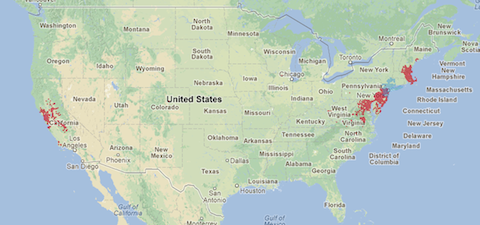
Xfinity WiFi is a great service that you’ve probably never heard of. Xfinity (or is it Comcast?) has an identity problem, but they also don’t communicate well, even to existing customers. Xfinity WiFi is part of Comcast’s plan to compete with cell phone companies by providing widespread, free access to high speed Wi-Fi (at least free to Comcast customers). They started testing this few years ago around Philadelphia and New York City, but recently expanded to a few cities in northern California. (Current map below.)

Here’s how it works. If you order new Business Class Internet service from Comcast the technician will install a second cable modem and a Wi-Fi router. In my case neither the sales person on the phone nor the installation tech mentioned this would be installed in my office; it was just nailed to the wall when I looked. That’s a pretty stealthy way of rolling out a new service, but it avoids all those pesky questions and approval steps so they can get more hotspots set up faster. I wonder how many companies are hosting a public Wi-Fi hotspot without even realizing it. In my case I was surprised and actually happy to get it because my office overlooks an outdoor courtyard with seating. So it’s a nice public service I can offer to the shoppers, restaurant and other tenants in my building.

I applaud Comcast (or is it Xfinity?) for taking steps to make ubiquitous Wi-Fi available and free for me. The only problem with the service is the way they implement their “Automatic Sign In” feature. When you first find one of these hotspots you have to sign in with your Comcast user name and password. That’s a one-time thing, which is really convenient. Whenever you come across another Xfinity WiFi hotspot you are automatically connected. It works perfectly. HOWEVER, THERE IS NO WAY TO DISCONNECT YOUR DEVICE from this Automatic Sign In feature.

Normally, on an iPad for example, you can go into Settings->Wi-Fi->Choose a network and click the “Forget this Network” button and you will have to log in again to use the network. Not so with Xfinity WiFi. Once Xfinity sees a valid log in your device is permanently connected – and I do mean PERMANENTLY – NOT EVEN WIPING/RESTORING THE DEVICE TO FACTORY SETTINGS WILL DISCONNECT IT.

I tested this by “Restoring” my own iPad to factory settings, which should be the best, safest way to prepare it for sale. But, surprisingly it connected to Xfinity WiFi without ever asking for a password again.

The problem here isn’t that someone will get access to your personal information. But if you sell your iPad, computer, or phone it will remain connected to your Comcast account as long as you have that account. What if the new owner sends inappropriate emails to a four-star general, or CIA agent? The FBI will be knocking on your door because Comcast will tell them the device is yours. The new owner may not even be a Comcast customer, yet they would have free use of this service.

The only explanation about this is found in the Xfinity WiFi FAQs:

“Automatic Sign In is a feature that identifies devices that have successfully signed in to the XFINITY WiFi service previously, and allows these devices to connect to the network in the future without the need to sign in, as long as the account remains active and in good standing.”

It feels very wrong to have strangers potentially connected to my Comcast account. Am I just being paranoid? At a minimum, it seems like my Comcast account management page should include a listing of devices that are “attached” to Xfinity WiFi and give me the opportunity to detach one or all devices.

Have you talked to Comcast support about this issue? Let us know what you heard.

Stay safe out there.

Xfinity WiFi Distribution – November 2012

Xfinity WiFi map Nov 2012

Apr 10th, 2012 1 Comment

WiPNET provides Internet over existing in-home cable TV coax wire

Anyone with a large, multi-level home or office knows that a single Wi-Fi router doesn’t always provide coverage in every room. In my case, we recently moved into a 90-year-old house with very solid walls. The router in the living room is barely visible to the iPad when I’m reading in bed, so the connection is slow, if it works at all. We also don’t want a printer in the living room so a wired solution in one of the back rooms is required.

l

Stringing a new Ethernet cable would be possible, but not fun. I tried several models of Wi-Fi repeaters in the past, and tested newer models when we moved into this house, but their performance and reliability were not acceptable.

Fortunately, like most houses today our place was wired with coax cable for television in every room years ago. Now a new Rochester NY company called wi3 has come out with an amazingly simple product called WiPNET. I don’t know why it took so long for someone to figure this out, because the whole thing is so obvious, and simple.

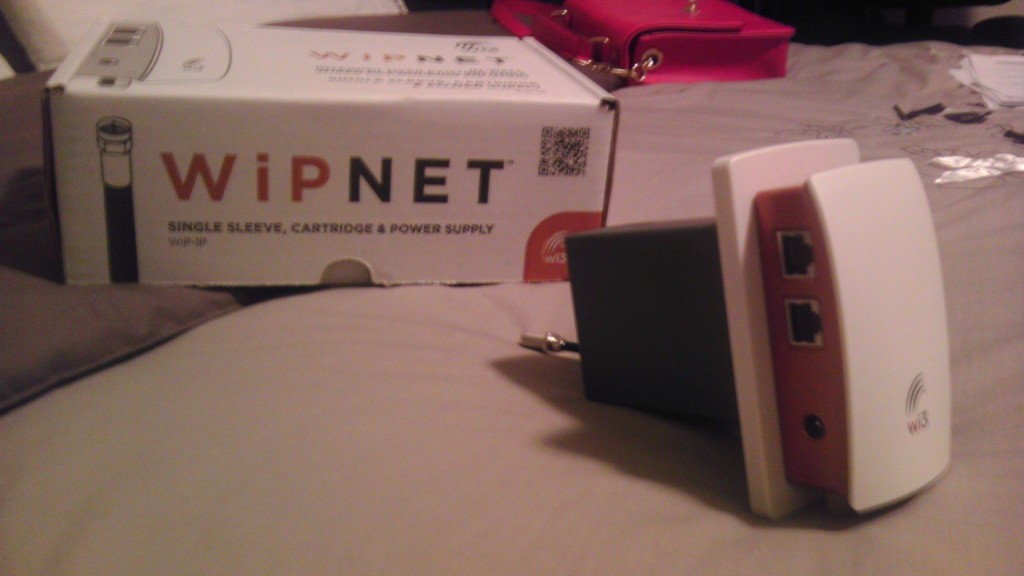
The photo at right show a single WiPNET device. This mounts in the wall like a standard electrical outlet, typically wherever your cable TV connection comes out of the wall. The WiPNET box has two coax connectors and two Ethernet jacks.

I set up one of the WiPNET devices near the television in the living room, where I also wanted the Wi-Fi router. This was also a convenient place since I had one coax cable TV wire coming in to the WiPNET box, and a second coax cable TV wire going out of the WiPNET box and on to feed the rest of the house. A standard Ethernet cable was run from the router to one of the Ethernet connectors on the WiPNET device.

A second WiPNET box was placed in one of the back rooms near a desktop computer and network printer. This device was connected to the cable TV connection in that room, and then the cable box was hooked up to the second coax connector. The computer and printer were connected to the two Ethernet jacks on the WiPNET device and, like magic, they were wired into the router in the front of the house. After testing the setup for a few days I connected a second Wi-Fi router to the WiPNET device in the back of the house. That signal is strong enough to cover the backyard as well as the rooms.

The WiPNET devices have a light that glows white if the two devices are communicating Ethernet signals properly. The light glows red if there is any problem. At first I had a problem with the connection, but after removing three unnecessary cable splitters the lights glowed white. (Apparently, each cable splitter will degrade the signal a little. Too many splitters and no more signal.)

The company is new and the last time I checked in they didn’t have any retail distribution set up yet. But several home audio/video dealers around the country are carrying the products. I ended up purchasing from Design Tech Electronics in the Washington DC area.

For more information visit the wi3 website.

Jul 23rd, 2010 2 Comments

Testing paid online advertising

Advertising, when done correctly, is part art and part science. Unfortunately most small businesses only consider the art – they spend money on design services, copywriters, color selections and logos. Completely ignored is the science: documenting and measuring user actions, analyzing results, feedback loops. Today’s guest contributor, Sara Morgan, is an author and marketing consultant. She recently conducted several online advertising experiments for her own business and has kindly offered to share her experience and conclusions.

Is Paid Advertising a Waste of Money for (My) Small Business?

I am a former corporate web developer who now focuses on producing easy to follow technical guides for small business owners. Through the years, I have tried various paid advertising campaigns using Google Ad Words, but always met with no success. I had pretty much given up on Google entirely, until the day I got an e-mail from LinkedIn. They offered me $50.00 off one of their Direct Ads and it was at that time that I decided to do a little experiment.

Read the rest of this entry »

Apr 11th, 2010 No Comments

The business case for the iPad – Part 2

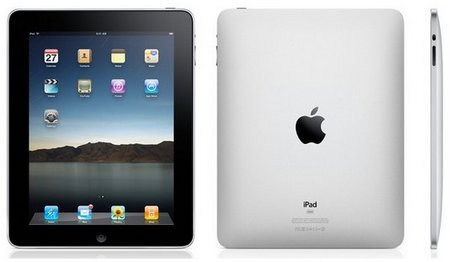
iPad From All Sides

Looking at the iPad from all sides

Read part 1 of this review.

The iPad has been available for a little over a week and Apple just announced that they have to delay international sales because demand in the US has been much greater than expected – apparently over 500,000 were sold in the first week. Cynics will say that it’s just a bunch of Apple fanboys and lemmings that blindly buy anything bearing the fruity logo, but I think there is something more at work here and that real business users are snapping these up.

Read the rest of this entry »

Apr 5th, 2010 2 Comments

The business case for the iPad

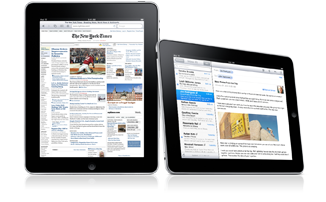
iPad standing tall and wide

iPad standing tall after 48 hours

Update: Also read part 2 of this review.

After spending most of the last 48 hours with the iPad in my hands I have to agree with Walt Mossberg that “…this beautiful new touch-screen device from Apple has the potential to change portable computing profoundly…” The folks at Apple like to shake up entire industries – iTunes and the iPod certainly changed the music business and Apple is now the largest music distributor in the world, and the iPhone showed the stodgy telecommunications industry what a phone should be, while Apple sold over 70 million so far. It’s too soon to know whether the iPad will have the same impact, but the early results suggest that it certainly has the potential.

Read the rest of this entry »

Mar 13th, 2010 No Comments

Location services are interesting, but do they have value for your business?

With the rapid proliferation of smartphones (Apple’s iPhone, Palm Pre, Blackberry, Google Android phones) people are suddenly broadcasting their location wherever they go. There’s an obvious benefit when emergency services need to find you following an accident, but it also presents some disturbing security implications. Ignoring the police and stalkers for now let’s take a look at how average people and businesses can use these services.

Foursquare logo

A few of us recently started experimenting with something called Foursquare. This company just celebrated its first birthday so they’ve had time to polish the rough edges on the service, and it’s pretty interesting. Basically, they provide two things: 1) an easy way to let people know where you are; and, 2) a way for travelers to find things to do in a new city.
Read the rest of this entry »

Feb 10th, 2010 1 Comment

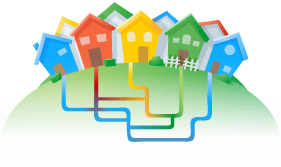
Google announces fiber optic network test

Google Fiber Optic Test

Google Fiber Optic Test

Google today announced an initiative to build broadband networks in local communities around the US as part of a test. Quoting Google:

“We’re planning to build and test ultra high-speed broadband networks in a small number of trial locations across the United States. We’ll deliver Internet speeds more than 100 times faster than what most Americans have access to today with 1 gigabit per second, fiber-to-the-home connections. We plan to offer service at a competitive price to at least 50,000 and potentially up to 500,000 people.”

The full announcement can be found on Google’s blog:

http://googleblog.blogspot.com/2010/02/think-big-with-gig-our-experimental.html

If you ever wanted fiber optic broadband to your home, office, or school now is your chance. Go to the following page and submit your information:

http://www.google.com/appserve/fiberrfi

Good luck, and let us know if you win.

Jan 16th, 2010 No Comments

Printed word not dead yet just getting harder to create

PDF My URL

pdfmyurl

During the ’90s, computers made training manuals and technical books obsolete. During the oughts, PowerPoint made printed presentations obsolete. Over the next few years, e-readers will make paper news and fiction obsolete. But once in a while you still need to print things, or just distribute a copy of something where Internet access is not available, and that can be difficult because Web pages are not designed for good-looking paper output.

A new Web site can simplify the process of grabbing a Web page and turning it into a PDF file. Called simply pdfmyurl, this Web site does exactly what it says. Enter any Web page address (URL) and it will hand you a PDF file.

There are other Web sites and desktop tools to this already, and Apple computers have the capability to create a PDF built right in. But Windows users have to go looking for the proper tools, and the results have been mixed. pdfmyurl is fast and handles formatting of complex pages very well.

If you frequently need to print Web pages pdfmyurl can save you lots of paper. After getting the PDF file you can easily delete unnecessary pages before printing them, such as a page filled with ads and Flash video, or skip printing the last page if it only contains a footer with navigation links.

Bear